How To Complete Post-launch checklist and notes
Spreadsheet can be found here:
https://docs.google.com/spreadsheets/d/1NEANVgkSaivqMDMPAIz9zjfB10XNjGhR411skQ7pyHU/edit?usp=sharing
It is under the support@websitesmadewithlove.com account.
The tab “2024 Launch” or similar is where you want to go for the ever changing list.
Notes
Install “user flow/tracking” add-on for form tracking form submissions
Formidable Forms, global settings for userflow thing
Turn on “Append IP Address, Browser, and Referring URL to message” feature for forms
go to each form’s settings under “actions and notifications”, email notification, and click the box for “Append IP Address, Browser, and Referring URL to message” found under the message box.
Take fresh backup
Make sure Mark has it connected to dropbox
Iubenda Cookie Policy
Start with these services then add more once it scans the site. Will change to static at a later date.
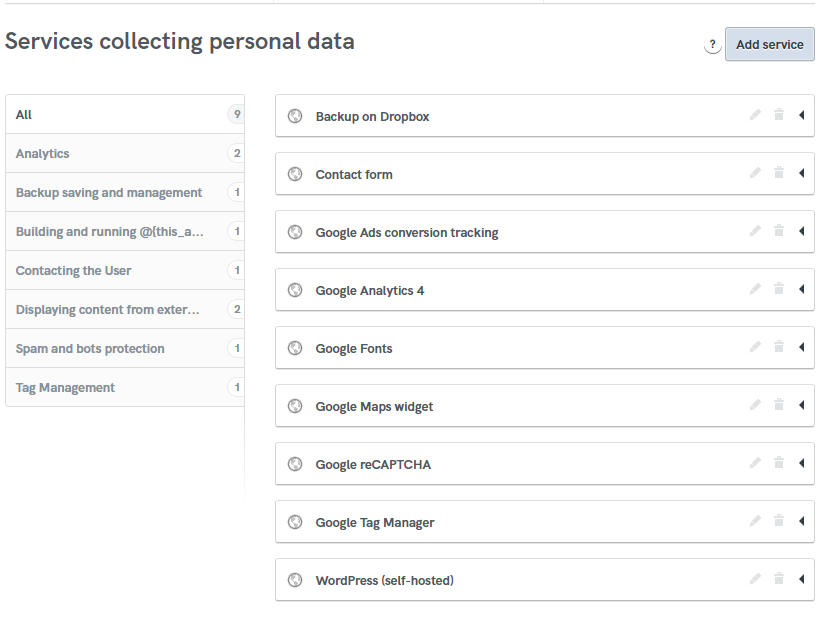
Choose “embed text in the body” option on Iubenda.
On the WordPress website, make sure the cookie banner has one of the following (first one for regular sites, second one of there’s a terms and conditions)
<p><span>We use cookies to offer you a better browsing experience, analyze site traffic and personalize content. Read about how we use cookies and how you can control them in our <a href=”/privacy-policy/“>Privacy Policy</a>. If you continue to use this site, you consent to our use of cookies.</span></p>
OR
<p><span>We use cookies to offer you a better browsing experience, analyze site traffic and personalize content. Read about how we use cookies and how you can control them in our <a href=”/privacy-policy/“>Cookie Policy</a>. If you continue to use this site, you consent to our use of <a href=”/privacy-policy/“>cookies and our terms and conditions.</a></span></p>
Delete dev site, dev db, dev dbu
All this information can be found in the client drive under the kickstart/db file. I often copy/paste the database info from the wp-config file because the automatic WP installation creates that stuff without my input.