Author: madewithlove

How to add WMWL footer to website.

Link to How To: https://docs.google.com/document/d/1H1RKiccJ3htR8buPF24iiKcttAwHuObqgITCponONeE/edit?usp=sharing

Introduction

Do not use the image element in Yootheme Pro, as it doesn’t allow for enough variables. Use a text element and add the HTML below.

Instructions

  1. Use a text element in Yootheme Pro.
  2. The code below may have to be adjusted for:
    1. Actual file name/location

    2. <p><img src=”wp-content/uploads/2020/09/logo_horz_blk.svg” alt=”Footer logo for Websites Made With Love in Parksville, BC” width=”180″ title=”Click here to visit Websites Made With Love, a Vancouver Island Web Agency based in Parksville, BC” class=”alignnone size-medium wp-image-30″ target=”_blank” rel=”noopener noreferrer”/></p>

  3. This is better for a few simple reasons:
    1. Can add the rel=”noopener noreferrer” class
    2. Can add the title=”Click here to visit Websites Made With Love, a Vancouver Island Web Agency based in Parksville, BC” class
    3. It just gives us a bit more flexibility using HTML
How to Update Rates Page

Here is an example of how to update the rates on a client’s website.

In this example, the client is Oceanside Physiotherapy and they are editing the rates for their services.

Essentially, you want to follow these quick steps:

  • Login to WordPress and take a fresh backup before making any edits.
  • Find the page where the edits are to be made and navigate to the Yootheme Builder for that page.
  • Hover on the builder live panel to find the elements to edit on the left panel and make your edits, as required.
  • Close the builder, once the edits are complete. (You could even save the revised page layout, if you want, too)
  • Take another backup, after your edits are completed to save your work.

Here is a quick video explainer, as well.

Allowing Zapier to access leads from Facebook page

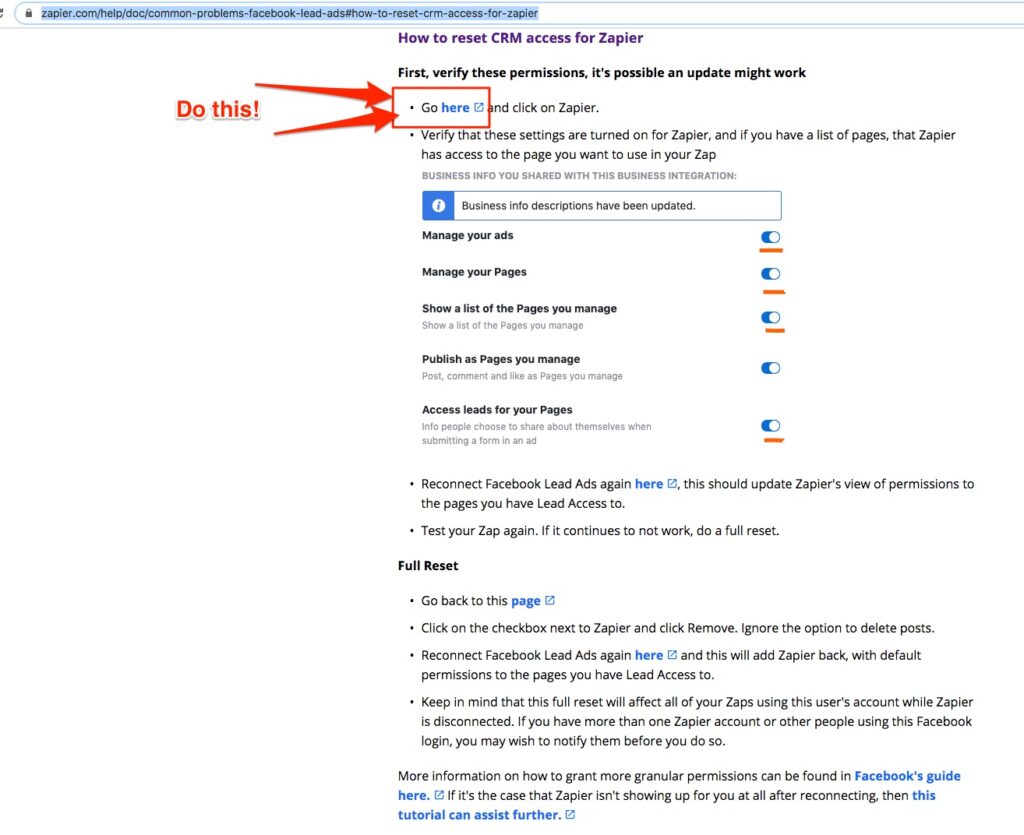
If you are trying to use Zapier to push Facebook Leads from Ads to a CRM or by email you will need to do two extra steps.

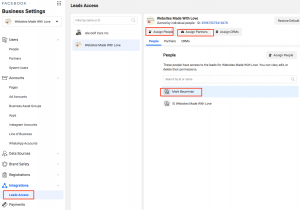
  1. Go to Business Manager, make sure you have all the proper access level of the page and ad account.
  2. Go to the Leads/CRM tab and check access there, too.
  3. Go to Facebook page and edit Zapier settings to allow that page.

Login to WordPress dashboard will not work

Ensure you have the correct password. Keep login screen open and open a new tab.

Login into Cpanel or FTP.

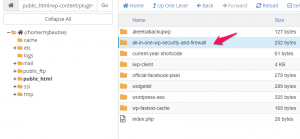
Go to : public_html/wp-content/plugins

Rename all-in-one-wp-security-and-firewall to all-in-one-wp-security-and-firewallHOLD

login back into the site websitename.ca/wp-admin 

once logged into the Dashboard, Go back to cpanel change all-in-one-wp-security-and-firewallHOLD back to all-in-one-wp-security-and-firewall 

Reactivate the plugin in WordPress.


Current Year Shortcode

Current Year Shortcode (Footer Copyright)


From Website:

Get current year, copyright and trademark symbol with shortcode.
Put [y]* for display current year.
Put [c] for display copyright symbol ©.
Put [t] for display trademark symbol ®.
Put [cc] for display “Copyright”.
Put [cyy year=”2003″]* for display symbol of copyright, first year, current year (ex.©2003-2018).
Put [cyyl year=”2003″]* for display copyright, first year, current year (ex.Copyright 2003-2018).
Put [cyyls year=”2003″]* for display copyright (+©), first year, current year (ex.©Copyright 2003-2018).

*For shortcode with year you can choose format with attribute format=””. It support “Y” (es.2018) or “y” (es.18). Default format without attribute is “Y”.

You must enter year attribute in the same format.

Example [cyy year=”03″ format=”y”] print ©03-18 [cyy year=”2003″ format=”Y”] print ©2003-2018


[c] [cc] [y] Isle Golf Cars Inc.<br>All Rights Reserved