Yootheme login flickering 404 page
You log into a website and get a 404 flickering page instead of the dashboard…
The fix:
Akeeba WAF -> configure WAF -> Admin URL action -> set to “Home” instead of “Block”
You log into a website and get a 404 flickering page instead of the dashboard…
The fix:
Akeeba WAF -> configure WAF -> Admin URL action -> set to “Home” instead of “Block”
Your Full DNS “Mailbox” (Hosting Nation cPanel) – Like a House with Signs
|
Sign on Mailbox
|
Meaning
|
|---|---|
|
A yourdomain.com → 142.44.215.123
|
“House is here”
|
|
CNAME www → yourdomain.com
|
“www is just a nickname”
|
|
MX → aspmx.l.google.com (1)
|
“Send all mail to Google”
|
|
TXT “v=spf1 include:_spf.google.com ~all”
|
“Only Google can send from here”
|
|
TXT google._domainkey → [long code]
|
“Here’s the key to prove it’s us”
|
|
TXT _dmarc → p=quarantine
|
“Fake mail? Spam folder, please”
|
|
Record
|
TL;DR
|
|---|---|
|
A
|
Tells the internet the IP address of your website
|
|
CNAME
|
Says “this name is just an alias for another name”
|
|
MX
|
Tells mail servers where to deliver email (@yourdomain.com) |
|
TXT
|
Holds text notes like SPF, DKIM, DMARC, or Google verification
|
1. MX Records – “Where do I deliver mail addressed to @yourname.com?”
Priority 1: aspmx.l.google.com
Priority 5: alt1.aspmx.l.google.com
Priority 5: alt2.aspmx.l.google.com
etc.Super important: If you’re using Google Workspace, you usually delete any old MX records from your hosting company, otherwise mail still goes to the wrong place.
2. SPF – “Who is allowed to send mail FROM @yourname .com?”
v=spf1 include:_spf.google.com ~allTranslation in retard-speak:
If someone in Nigeria tries to send an email to your customers pretending to be you@gmail.com without going through Google’s servers → SPF fails → big red flag.
3. DKIM – “Proof the email actually came from you and wasn’t changed”
Google Workspace does this automatically once you add the DKIM record they give you in the admin console. You just copy-paste the TXT record into your DNS.
4. DMARC – “What should Gmail/Yahoo/etc do when someone fails SPF or DKIM?”
v=DMARC1; p=quarantine; rua=mailto:dmarc-reports@yourname.com; ruf=mailto:dmarc-failures@yourname.com; pct=100; fo=1Translation:
DMARC is what actually stops the spoofing. Without it, even if SPF/DKIM fail, many servers will still deliver the mail. With DMARC, you force them to spam or reject it.
How It All Works Together in Real Life (Google Workspace Example)
Where Do You Actually Put These Records?
Typical setup order when moving to Google Workspace:
That’s literally it. Once all three (SPF + DKIM + DMARC) are set up properly, almost no one can successfully spoof your domain anymore. Your emails also get better delivery rates because Gmail, Outlook, etc. trust you more.You’re now basically un-spoofable. Congrats.
Your Exact Setup: Domain @ GoDaddy + Hosting @ HostingNation.ca + Email @ Google Workspace
This is an extremely common Canadian setup — tons of people do exactly this. Hosting Nation is a solid little BC-based cPanel host, domain at GoDaddy, email on Google. It works perfectly.There are two possible ways this is actually configured in the real world. One is way more common with Hosting Nation customers.
The Way 99% of Hosting Nation Customers Do It (Nameservers pointed to Hosting Nation)
You (or they) changed the nameservers at GoDaddy to Hosting Nation’s nameservers.In GoDaddy → your domain → Nameservers → it says:
(or whatever their current ones are — they sometimes change, but it’s always their own).This is the easiest way for them because when you add the domain to your Hosting Nation cPanel account, everything “just works” for the website without you touching any A records.What your DNS records look like inside Hosting Nation’s cPanel → Zone Editor:
Type    Name              Value / Points to                          Priority   TTL
A       yourdomain.com.   192.168.XXX.XXX   (their shared server IP)          -        14400
A       cpanel            same IP
A       webmail           same IP
A       whm               same IP
CNAME   www               yourdomain.com.
CNAME   mail              yourdomain.com.   (usually left but doesn't matter)

MX      yourdomain.com.   aspmx.l.google.com.                        1        14400
MX      yourdomain.com.   alt1.aspmx.l.google.com.                   5
MX      yourdomain.com.   alt2.aspmx.l.google.com.                   5
MX      yourdomain.com.   alt3.aspmx.l.google.com.                   10
MX      yourdomain.com.   alt4.aspmx.l.google.com.                   10

TXT     yourdomain.com.   "v=spf1 include:_spf.google.com ~all"               14400
TXT     google._domainkey "v=DKIM1; k=rsa; p=MIIBIjANBgkqhkiG9w0BAQEFAAOCAQ8AMIIBCgKCA..." (super long string from Google)
TXT     _dmarc            "v=DMARC1; p=quarantine; rua=mailto:dmarc@yourdomain.com; fof=1" (or whatever policy you set)

(Optionally) TXT yourdomain.com. "google-site-verification=xxxxxxxxxxxx" (if Google asked for it during setup)A @ 192.168.XXX.XXX (Hosting Nation server IP)
CNAME www yourdomain.com. (or sometimes directly to a hostname they give like server123.hostingnation.ca)
MX @ aspmx.l.google.com. 1
MX @ alt1.aspmx.l.google.com. 5
... (same Google MX as above)
TXT @ v=spf1 include:_spf.google.com ~all
TXT google._domainkey (the DKIM one)
TXT _dmarc (your DMARC policy)Important Real-World Notes for Hosting Nation Specifically
GBP Q&A API Depreciation
– Google is changing things, likely adding AI
– It might disappear for a bit
– AI generated Q&A and search bars on the FAQ section have been tested. It looks like we won’t have direct control.
– Want something specific to show up? Make Google Posts to showcase certain things.
GBP Bugs/Issues
– appeal delays
– verification processing delays (including videos, even up to 2 weeks)
– missing reviews
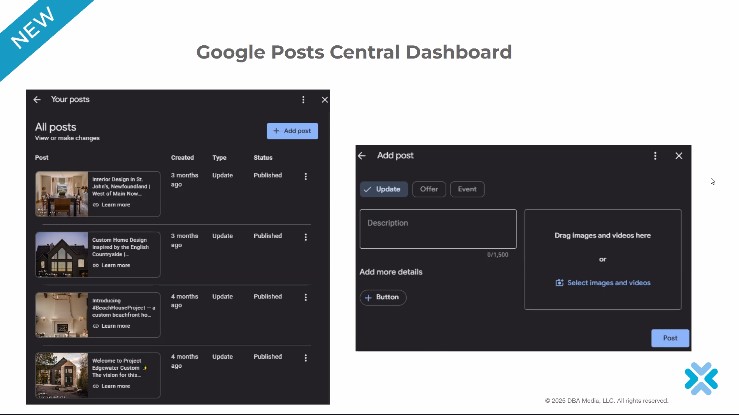
Google Posts Scheduling
– You can now schedule your posts (well, it’s rolling out)
– They are trying to make it more like a Social Media thing
– Don’t know how many you can post at a time, but they have discussed adding more robust features
GBP What’s Happening for Multi-Location
– Grabs event info from third-party areas
– Used to be just one location, now its multi-location
– its an event listing on the GBP listing
Google removes param &num=100
– No longer formally supported
– in response to AI system scraping
– effects rank trackers
– impressions go down, rankings go up, because now we are looking at page 1 instead of first 100 hits
Cookie Consent Banners
– when visitors decline consent tracking, GA4 will not collect data for that session
– If they click “no” and click around, their hits get lumped together into “Direct”
GatherUp Local Business Q3 Review
– not searchable, just from Yan’s secret stash
“how do you usually search for local businesses when you need something?”
most people still “I type my query into a search engine or maps” 75%
i use voice search on my phone or smart speaker 15%
ask AI 10%
personal recommendations under 10%
– so 10% of people now go to AI to find a local business
“how often do you click through on the links for AI responses”
– most people do not trust ai directly (only about 10%)
– 30% always check, 20% frequently, 25% sometimes, 7% rarely
“how often do you read online reviews before choosing a local business?”
– always 40%, frequently 35%, sometimes, 20%, rarely 5%, never 2%
The Customer Journey Tracking is Becoming More Complex
– AI Discovery search (awareness) to Google Brand Search to read reviews (Consideration) to Click to website/call (conversion)
Better Lead Tracking
– use UTM parameters on all links shared online
– implement call tracking software with dynamic number insertion
add “how did you hear about us” field to your contact forms
-train staff to ask every new customer “how did you find us today?”
– use a QR code on in-person materials to track offline-to-online traffic
– set up Google’s Consent Mode to model data from users who decline cookies
Google verification criteria for videos
– prooving the business exists (showing office or truck with signage)
– prooving you are the owner of the business (key to unlock vehicle or house)
– prooving where you are located
– support agents will literally go to google maps and look around and see if it matches
– the video you take may be cropped, so ensure the video is super clear
– for the locked door, you have to show its locked first and that your foot isn’t holding it open or anything
– don’t pan too fast
More channels, more visibility: apple integration (dba platform thing)
– seamless analytics and content opportunities agross google and apple
– apple has become more important, google has lost 30% of its search traffic in the last year probably due to apple and AI, so dba is in the process to integrate apple so you can see google and apple side by side
– dba platform has a beta available soon, if you’re interested contact Luke Luke@dbaplatform.com
This is a great use case for a Formidable Forms View, but to send it as a reliable attachment, you’ll need the Formidable Forms PDF Add-on (which is typically available with their Business or Elite plans).
Here’s the general process using the PDF Add-on:
Your membership card view needs to display the data for only the entry that was just submitted. You likely already have this set up by using a filter in your View settings like:
Entry ID equals [get param=entry_id]
The PDF Add-on lets you generate a PDF from either the raw entry data or a specific View. To use your custom-designed membership card View:
frm_pdfs_email_attachment_args Hook (If a Setting Isn’t Available)
If there is no direct setting in the Email Notification to select the View, you’ll need to add a small snippet of PHP code to your child theme’s functions.php file to tell the PDF generator to use your specific View for that email notification.
<?php
// Apply a Formidable Forms view for the attached PDF in email.
add_filter( ‘frm_pdfs_email_attachment_args’, ‘add_view_to_attached_pdf’, 10, 2 );
function add_view_to_attached_pdf( $pdf_args, $args ) {
// CHANGE ‘5’ to the ID of the Form
if ( $args[‘form’]->id == 5 ) {
// CHANGE ’10’ to the ID of your Membership Card View
$pdf_args[‘view’] = 10;
// This ensures the PDF shows the detail of the current entry
$pdf_args[‘id’] = $args[‘entry’]->id;
return $pdf_args;
}
return $pdf_args;
}
// Add any other custom functions below this line
5 to the ID of the form that generates the membership card.10 to the ID of your Formidable View that looks like the membership card.
In the view make a filter
entry id equals [get param=entry]
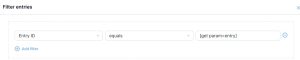
and in the grid advance settings limit 1
New GBP categories
GBP bugs
August 2025 spam update rolled out. The last one was rolled out in December, usually takes 1-2 weeks. Targets low-quality content & link manipulation (buying links). Mostly impacts informational sites/blogs.
Google Posts Central Dashboard
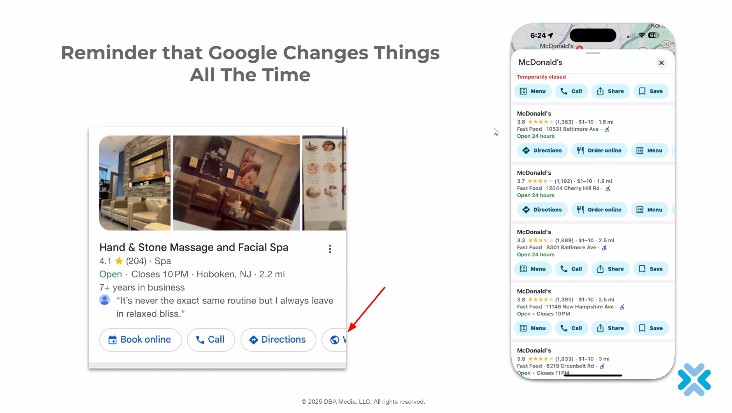
Google changes things all the time
ChatGPT
Google AI Overview
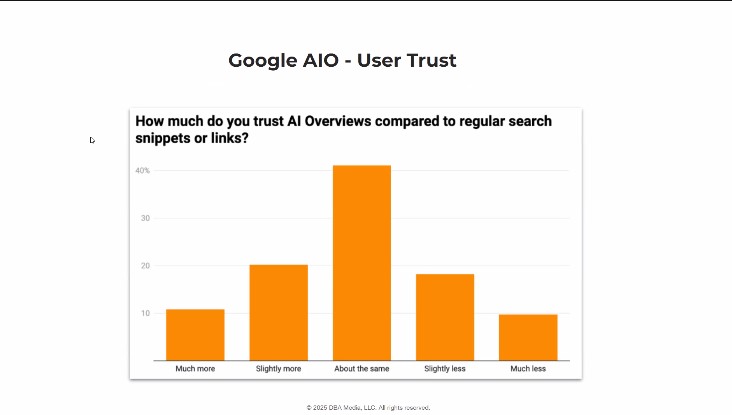
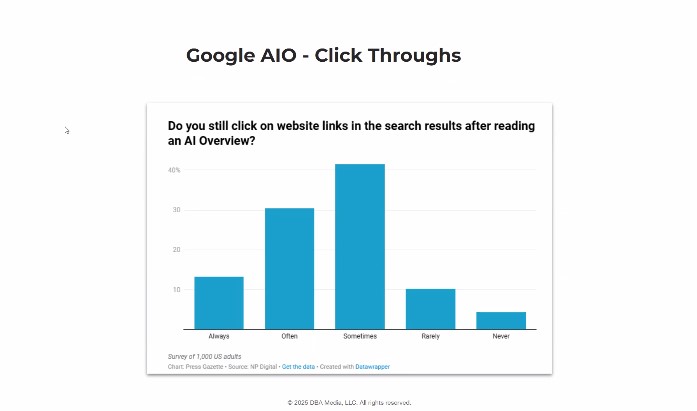
Google AIO
My Question
Does AI like long, informative website pages or more “to the point”? You mentioned multiple queries, so not sure if just having a short and sweet answer is good, or if there’s benefit to telling a bit of a story. Like, for exterior cleaning in Nanaimo, do I want my gutter cleaning service page to be worshipping “Nanaimo Gutter Cleaning” in every aspect I can think of, or is it too much?
More straightforward is better. The narrative content isn’t as good. AI is like the Vulcan, the logic and basic facts matter. I do this, I’m good at this, why am i good at this? here’s proof i’m good at this, i won an award so I’m the best at this. Tell the AI you are the best. FAQ is good. Why should I hire you? why should I trust you? Less keyword stuffing, although we are kinda inbetween right now. What would convince a person? That’s what we want to go for. Don’t fluff, don’t add extra stuff. People want to call, they don’t have much time reseraching. Show your proof right away. 10 employees, 5 trucks, we sponsor little league, i’m a family business owner -> those are keywords AI like to see.
Other questions
Im in the self storage industry. We see 2 different primary categories- Self storage facility vs storage facility. How do we know which one is the best for the primary?
You have to test it, but changing category can risk suspension. What’s the primary category of your competitors? It can help guide what Google might like the best. If you have a secondary category like “luggage storage” then have a page on your website that talks about this. Your listing should have things that your website can support/backup.
What are the three most beneficial actions, and at what rate, one can take to improve maps ranking?
Reviews, content on the website, and pictures/posts (the easy stuff). Backlinks from local places, like other companies you’ve worked with strengthens the local linking to show a stronger connection.
SE Ranking bought Planable so they are now offering it to SE Ranking customers. It is a social media management platform.
Planable 30% discount for the first year with existing SE Ranking accounts.
pricing without se ranking: https://planable.io/pricing/
some online demo thing https://planable.io/product/
-Similar to FB campaign planner, but can connect up to 9 platforms.
-Option to schedule and post, or you can have an approval process (this can get complicated if you want it to, such as needing mulitple approvals before it gets scheduled to post)
-Team vs client views (so like, WMWL team can comment and make notes like in Google docs that are hidden from the client)
-Calendar view is most popular, it is like what we’ve used for FB/Instagram
-You can make a single post and have it look the same on all other platforms, then unsync it to make it unique (like how instagram can’t have links). So, it is really fast.
-Can link to Canva so you can import designs instead of dowloading/uploading
-They have basic analytics and are working on improving it within the next couple of weeks.
-Not whitelabelled, so clients can see we are using Planable
New Google Business Profile categories
New GBP Bugs
Suspicious Review Message
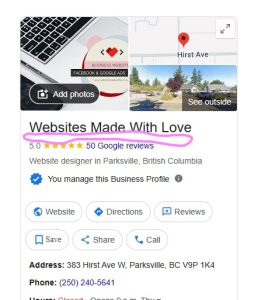
(the message appears in the circled area on affected profiles)
“Suspicious high-rated reviews were recently removed from this place.”
GBP Products
AI Overviews
Bugs/Issues
– side panel missing on dashboard
– school reviews being removed inconsistently
GBP Categories Added
– bartending services
– esthetics service
GBP Q&A going away?
– no, no official announcement
– but its missing on most desktop knowledge panels
– it still shows on Google Maps results
– keep using it
Google Search Is Declining
– Ai and in-app search (like Apple Maps) now account for a big chunk of the total search volume.
– Nearly 40% Gen Z users start product or local discovery on platforms like TikTok or Apple Maps rather than Google. (Google 2022)
– It is forecasted that Google’s overall serach ad share could fall below 50% by 2026 (Insider Intelligence, 2024)
Citation Management
– backbone of local search visibility
– it is critical for local search because consistent and accurate business information across the web directly affects your local SEO performance, trust with customers, and visibility in search engine results (especially Google)
– clicks to websites are going away, so we need more citations
– Google uses citations as trust symbols, especially if they are consistent
– Online directories don’t matter as much to Google, but Bing and Apple are a bit behind. They are getting more important again because Google is falling and Bing/Apple are rising.
– Consistency matters, things like 123 N street is different from 123 North Street.
– Smart assistants (Siri, Alexa, etc) rely on citation data
Citation management local search
– is it working?
– are there errors?
– how do i fix them?
– am i better than my competitors?
– how do I prove it?
dba platform accuracy report (in beta)
– a clear quantifiable snapshop of how your listings appear across top platforms
dba account activity report
– every change, every sync, every action is documented and searchable
– good for holidays and things where you have to temporily update store hours across multiple platforms
– google does not have this yet (who did what on my account?)
dba sync issues report
– see whats blocking your listings and how to fix it
dba platform new audit tool
– type in a business name, connect to google places api. Run scan.
– pulls from search results; google, apple, bing, FB down the line
– shows every location, easy fixes
the increasing importance of apple
– a new powerhouse in the making
– Apple Maps is no longer a background app, it’s a major player in local serach.
– the default navigation app for iOIS devices, viging businesess listed on Apple Business Connect direct access to over half US smartphone users.
– apple maps drives 10% of phone calls and 5% of website visits that GBPs do not (NearMedia.co, 2023)
– Apple Business Connect is like GBP but a huge pain. Search the business on Apple Maps and “claim this place”. All businesses should be claimed.